
Wednesday, March 21, 2012

Simsimi 3.8.2 for Android [Apk]


SimSimi

Description
****************************************
[ISSUES NOW FIXING]
- Language : English optimization is being processed.
****************************************
You can turn on/off Bad expression filter in Setting tap
****************************************
SimSimi is a super advanced chatting robot that makes amusing conversation to engage with users.Using this app is really simple. Just start a talk session at your touch screen then Simsimi will instantly greet you with a cheerful chat. Like those typical messaging apps, just send your message through a chatting box. Dont be surprised by Simsimis fast response. Its a super-duper robot, you know!Simsimis vocabulary grows by your input. You can teach Simsimi your own words as other users teach their own ones too. If Simsimi has no data to answer your former message, it will say 'I HAVE NO RESPONSE'. Then you might select the 'TEACH' tab and instruct it your own words in a paired form of request & response. Once you teach Simsimi a pair of words, it will make a response with those words immediately (approx. 3 minutes).Have fun with the cutest chatting robot ever, Simsimi!
********************
SimSimi web version is available now!
We are introducing an alternative way to chat with SimSimi.
For users waiting for bug fixes or those using Blackberry, Windows Mobile, etc, a web version for SimSimi is available in the meantime at http://simsimi.com.
********************
SimSimi was originally developed to be a fun and friendly chatting robot. Things SimSimi says are totally taught by users and not intended by the developer. This means there are some abusers that are making SimSimi to say nasty words.





via Google Play


Poweramp Full Version Unlocker For Android [Apk]


Poweramp Music Player FULL for Cherry Mobile Flare
Poweramp Full Version Unlocker For Android [Apk]


Description
Poweramp is a powerful music player for Android.

For years people have bought the idea that you have to spend $300 dollars on headphones to get the best quality, and Poweramp is here to prove that that is a lie. I built Poweramp for people like me that love music, and want to listen to quality every time they put on their headphones without having to go out to a store and spend their paycheck for something that just oversaturates your ears with too much bass or treble. Poweramp was built to make music quality a priority. The next release of Poweramp 3.0 will bring a lot of new features and functionalities, but one thing I can promise you is that it will not stop being just a music player. Poweramp will never play videos, it will never be a web browser, it won’t even become a cloud music service—it will always be a very powerful music player and nothing more. 

Key Features:
  • plays mp3, mp4/m4a (including alac), ogg, wma*, flac, wav, ape, wv, tta, mpc, aiff (* some wma pro files may require NEON support)
  • 10 band optimized graphical equalizer for all supported formats, presets, custom presets
  • separate powerful Bass and Treble adjustment
  • stereo eXpansion, mono mixing, balance
  • crossfade
  • gapless
  • replay gain
  • plays songs from folders and from own library
  • dynamic queue
  • lyrics support, including lyrics search via musiXmatch plugin
  • embed and standalone .cue files support
  • support for m3u, m3u8, pls, wpl playlists
  • OpenGL based cover art animation
  • downloads missing album art
  • 4 configurable widget types
  • configurable lock screen with optional Direct Unlock
  • headset support, automatic Resume on headset and/or BT connection (can be disabled in settings)
  • scrobbling
  • tag editor
  • visual themes, including support for external/3rd party skins
  • fast library scan
  • high level of customization via settings
Want to make it full version??

Ingredients:
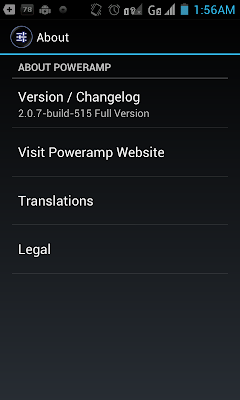
Poweramp Music Player (Trial) v2.0.7-build-515.apk [Download HERE]
Poweramp Full Version Unlocker v1.1-build-12.apk [Download HERE]
Lucky Patcher v2.4.3.apk [Download HERE]

Extra Skins:


Procedure:
1.) Install PowerAMP v2.0.7 [Don't Run]
2.) Go to Apps -> PowerAMP -> tap on Force Stop then tap Clear Data
3.) Install PowerAMP Unlocker [Don't Run] (You can tap Force Stop/Clear Data also)
4.) Install Lucky Patcher v2.4.3 [Don't Run]
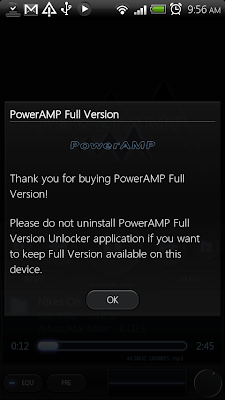
5.) Run PowerAMP v2.0.7 app  and you should see the "Thank you for buying Full version" popup window.


6.) Exit PowerAMP
7.) Go to Apps -> PowerAMP -> tap Force Stop (Don't click Clear data this time) 
8.) Run Lucky Patcher  
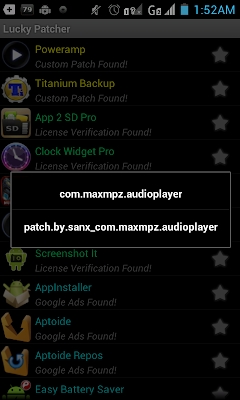
9.)Tap on Poweramp and choose patch.by.sanx_com.maxmpz.audioplayer
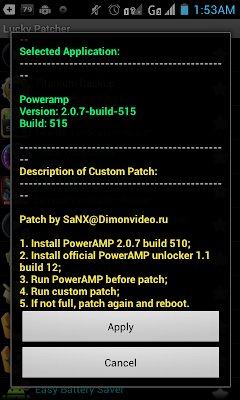
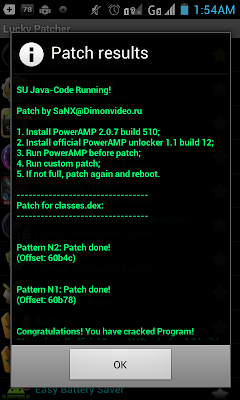
10.) Just follow the instructions on the screen then exit Lucky Patcher afterwards.


8.) Run PowerAMP v2.0.7 and it should be a full license now. You shouldn't see that upside down orange triangle anywhere about the license being invalid.


Notes: 
*If you are uninstalling a lower version, dont forget to delete com.maxmpz.audioplayer in data/apps so as not to get out of space error.
*If the app is not full,apply the patch again then reboot.

Monday, March 19, 2012

Android Secret Codes


Android

This time we will share about the Secret Code Android, OS made ​​by Google which is currently being famous. The code is very exciting for you to know because manufacturers deliberately hid.

Many kinds Secret Code Android that you may not know before. If you hard to memorize, CoPas the code then copy in Notepad.

*#*#4636#*#*
This code can be used to obtain interesting information about the phone and battery, including:

* Phone Information
* Battery Information
* Battery history
* Statistics usage

*#*#7780#*#*
This code can be used to reset the data, including:

* Google account settings saved in the phone
* The system settings application data
* Applications are downloaded

TUTORIAL: How To Fix Removed Unexpectedly Error (SD Card) In Galaxy Y

Samsung-Galaxy-Y-error-fixed


In this tutorial, we are going to learn how to fix sd card removed unexpectedly error in samsung galaxy y. This is a common error for all galaxy y users who had upgraded the firmware from 2.3.5 to 2.3.6 DDKJ2. Many galaxy y users are reporting that they are having this error.

Before, I didn't find any error in my phone ,as i upgraded my phone from 2.3.5 to 2.3.6 DDKJ2 an error has been appearing every time in my notification bar saying " sd card removed unexpectedly ". I thought it was my phone fault , but when i google'd about this error i came to know that many galaxy y users are also facing the same error and they told me that it was the firmware fault.

Then I upgraded my firmware to 2.3.6 DDKL1 and my phone had finally recovered from the error!

Some of my friends still have same error though they have upgraded to 2.3.6 DDKL1. So what to do now?? Don't worry I have a solution too for this error. Just Replace your Memory card with a new Memory card then Reset your phone , thats it! Now the error has be fixed...If you have any other issues please comment below so that i can know your problem and can fix them. Don't forget to subscribe to this blog so that you don't miss updates from us!

Thursday, March 8, 2012

TUTORIAL: FREE 50GB Box.com Cloud Storage


 http://www.resourcesforlife.com/wp/wp-content/uploads/2011/12/20111202fr-box-online-cloud-file-data-storage-collaboration-300x300.jpg
Are you still contemplating where to store and backup those precious personal and business files in? Well how does a FREE 50GB cloud sound?

Get your FREE 50GB Box.com storage for life by simply downloading a the Android application on your phone (Android phone of course) via Android Marketplace.

Once installed, you will immediately be credited the 50GB regardless of you just registered a new account or logged into your existing account. This promo will end by March 23, 2012.

just follow these steps:
  1. Download the app by searching for Box.net (the Box.com address is still relatively new)
  2. Create an account (if you don’t have one)
  3. Login to activate a lifetime 50GB storage account.


TUTORIAL: How to Flash Samsung Galaxy Y via Odin


Disclaimer:  SGY Love will not be responsible nor liable for any damage that might happen to your device during this process though the possibility of any damage is negligible. Try this at your own risk. This process has been tested and verified working on Samsung Galaxy Y.


Hello Guys .. Ginawa ko ang THREAD na to para sa mga Newbie na nahihirapan mag Flash ng Firmware ng Samsung Galaxy Y gamit ang ODIN .. Mas madali ito Sundan kasi my mga Screenies din na nakalagay dito .. Sana ma gustuhan nyu Have a nice day .. Happy Flashing!


How to Flash Samsung Galaxy Y via Odin

WARNING : Before Flashing Make sure na 100% or 50% ang Battery ng SGY mo .. para maiwasan masira ang SGY ..


Step 1 : Idownload nyu muna ang mga FILES na nasa Download Link at Attachment natin .. Ang Nasa Mediafire Link ay un ang firmware na gagamitin natin para makapag Flash tayo gamit ang Odin at ang nasa Attachment naman ay ang ODIN3 v1.84 .. Try and Tested ko na yan 

*Firmware Download Link :
http://www.mediafire.com/?q31qq9op3i1u831
*Odin3 v1.84 Download Link :
http://www.mediafire.com/?dxm1xlag84lpleb

Step 2 : Extract nyo sa Desktop nyu un mga files na Dnownload nyo .. after nyo ma extract un Firmware at Odin na download nyo .. eto ang makikita nyo

*Firmware :


*Odin3 v1.84 :

Step 3 : Open nyu un Odin3 v1.84 na Dinownload nyu .. If naka windows 7 or Vista ka RUN IT AS ADMINISTRATOR para sure .. Then my makikita kau jan na PIT at FILES DOWNLOAD. Jan muna tau mag Focus dahil ang Dnownload natin na FIRMWARE jan natin ilalagy .. Click nyu un Button ng PIT then Browse nyu un folder na inextract nyu and Click nyu un file na totoro_0623.pit. Ayan nakapag lagay kana sa PIT .. Same lang din gagawin nyu sa FILES DOWNLOAD. Click Browse Lang .. Sundan nyu un nakalagay sa Screenies ko


PIT : totoro_0623.pit
BOOTLOADER : BOOT_S5360DDLA1_REV05.tar.md5
PDA : PDA_S5360DDLA1_REV05.tar.md5
PHONE : MODEM_S5360DDLA1_REV05.tar.md5
CSC : GT-S5360-MULTI-CSC-ODDLA1.tar.md5

Note : About RE-PARTITION .. Pwede nyu Check or Uncheck .. Uncheck if gusto normal Flashing lang .. Then Check if you want Flash repair your Brick SGY .. So far pag mag Flash ako pag my Totoro Pit Check ko parin un RE-PARTITION .. Same way Para sure But its up to you

Step 4 : Ayan naka-Ready na ang Odin3 v1.84 natin .. Ngaun Turn Off nyu na ang SGY nyu .. Make sure na walang SIM at SD Card para Maiwasan natin ang pag bura ng Important files or Make sure You Have a Back up your Contacts and Other Files and Make sure din na naka-INSTALL na ang Driver ng SGY mo sa pc mo or my Naka-Install nang Samsung KIES na application .. If Wala pa punta kau dito Samsung.com/Kies Pag naka turn off na .. Then Press POWER BUTTON + VOLUME DOWN + HOME BUTTON Saby Saby yan huh .. After that my mag aappear sa Screen ng SGY nyu at eto un nasa Screenies natin


Sorry kung hindi malinaw pag kaka PICTURE ko sa SGY ko. Anyway after that diba yan na un lalabas .. then my mababasa kau jan na warning .. then meron jan Option na pag pipilian mo .. If VOLUME UP to CONTINUE or VOLUME DOWN to CANCEL OPERATION .. If gusto nyu ituloy Press nyu un VOLUME UP .. Then Lalabas ang Download mode Screen nyu .. Check my Screenies ulit


Ayan nasa DOWNLOAD MODE kana ..

Step 5 : Ngaun Iconnect na natin ang SGY natin na naka-DOWNLOAD MODE sa PC natin na kung saan i-senet up natin ang Odin3 v1.84. Dapat my Colour Yellow ka makita sa ID:COM at my nakalagy sa Message Box na Added!! Word .. It Means nakaConnect na xa via Odin .. Like this

Step 5 : Ayan Connected na .. Before Clicking Start Button .. Check nyu muna kung tama un pag kakalagay nyu ng mga FILES DOWNLOAD .. If wala na Problem GO! Click Start Button and Wait Until it Finish!  Success !! ito ang Screenies pag Ok ang pag Flash nyu via Odin


Note : After nyu makitang nag Success ang Flashing nyu wag nyu muna aalisin sa PC ang SGY nyu .. Wait nyu lang kasi mag Coconfigure na yan .. then mag rereboot ulit yan .. Wait nyu until lumabas un Boot Screen nya. Then Pwede nyu na alisin

After maging Success ang pag Flash natin Do a Hard Reset itype nyu to *2767*3855# ang Purpose nyan para fresh na Fresh ang SGY natin .. After that mag rereboot ang SGY natin Wait Until it Finish again 

*TIPS and TRICKS :
Pwede rin iflash yung pda at csc lang thru odin in which case hindi na kailangan ung .pit file. Wag din lagyan ng tsek ung repartition in this case.

GOOD LUCK AND HAPPY FLASHING !! 


Wednesday, March 7, 2012

Magic Defenders HD v1.3.8 for Android [Apk]


Requirements: Android 2.2
Overview: 
Ready for magic circles, spells and an endless army of orcs?

- As seen in AppTrailers

Be the hero and defend your village from the evil orcs in three different invasion episodes. You will fight in the forest, near the walls and inside the town to defend the town’s last resort, the castle. Compete with people around the world for the highest score in an endless battle to defend everyone in an arcade style gameplay.

gravatarDownload:
http://ul.to/co7rcb68

Tuesday, March 6, 2012

Fragger v1.0.3 for Android [Apk]


Requirements: Android 1.5+
Overview: 
The world of Fragger is at risk, and he needs your help to explode all enemies!

Unleash your shooting abilities to kill all the enemies and unlock 3 different perks! Featuring 340 challenging levels, and 11 different worlds, Fragger guarantees you many long hours of exploding fun! Once you become and grenade launcher expert, compare your score online with the millions of Miniclip users that play Fragger.

Once you become and grenade launcher expert, compare your score online with the millions of Miniclip users that play Fragger.

OTHER KEY FEATURES:
★ Amazing new graphics
★ Game Center Leader Boards and Achievements
★ Game music, which automatically switches itself off at start when playing other music on your iPod/iPhone
★ Local+Global high-scores lists
★ Interactive tutorial to learn how to play

gravatarDownload:
http://bulletupload.com/iezr6dtk5dxb

Mirror:
http://www.mirrorcreator.com/files/1OIVAIKH/Fragger_1.0.3.apk_links
http://ul.to/ydmcocat

Monday, March 5, 2012

Sliceween v1.2.6 for Android [Apk]


Requirements: Android 2.1+
Overview: 
Ready to be scared? Play Sliceween, a halloween themed physic game!

Sliceween is a great halloween physic game, where the goal is to get the bat to the haunted house using all the objects in the scene, such as :
- bars you have to cut,
- stone bricks,
- spiders,
- teleporters,
- and others!

Featuring 4 different worlds for a total of 80 levels, Sliceween will get you directly into the Halloween atmosphere.
The game is optimized for smartphones and tablets!

gravatarDownload:
http://ul.to/1te53vc3

Mirror:
http://bitshare.com/?f=51tz6o5d
http://bulletupload.com/8w2ibuqxq4um

Sunday, March 4, 2012

HeavenHell v1.3.1 for Android [Apk]


Requirements: Android 2.1+
Overview:
HeavenHell, when good fights evil!

In HeavenHell, the goal is to throw each demon out of the screen with the help of angels.
You’ll have to change devils and angels into circles or into squares by tapping them. It's all about following the laws of physics and using your logic!

Offering 4 different worlds and 80 levels, HeavenHell will transport you into a fun and challenging atmosphere .
The game is optimized for smartphones and tablets, so don’t wait anymore, download and share this game right away!
"The gameplay makes the game standout and also makes HeavenHell a to play." Adam Field for Android-Games.com
"Heaven & Hell on android offers long hours of gameplay (solving numerous puzzles), nice quality graphics, fun music, and more." JasonHamster.com

gravatarDownload:
http://ul.to/1dyxq8yk

Mirror:
http://bitshare.com/?f=iph76wkz
http://bulletupload.com/xf7iob8z9buf
http://extabit.com/file/28ebzi6zddoyf