Sunday, September 2, 2012

CUSTOM ROM: EVO X2 for Galaxy Y

Disclaimer: SGY Love will not be responsible nor liable for any damage that might happen to your device during this process though the possibility of any damage is negligible. Try this at your own risk. This process has been tested and verified working on Samsung Galaxy Y.
 
CUSTOM ROM: EVO X2 for Galaxy Y
 
FEATURES:
Rooted, Deodexed, zipaligned,has init.d support etc..
Based on DDLE1 firmware
A2SD
TW launcher
MIUI music player
This is a minimalist rom. there is around 99 mb free in the system partition.
Scrolling cache is disabled for smoother scrolling.
Lidroid 15 toggles.
6 lockscreens
swipe to remove notification
The kernel by savie has 4 usable frequencies.
832MHz,624MHz,468MHz,and 312MHz.
18 governors, 5 I/O schedulers are added.
Droid wall
EXT4
cifs
swap
Dualboot
bacem tweak
Undervolt
Default undervolt value is 100mV
Excellent battery life.
Small footprint.
Bootanimation,boot sounds,and shutdown sounds are removed.


HOW TO INSTALL:

1.Download the Rom zip file and 'blk_screen_fix.zip'.
2.put them on your sd card.
3.Switch of your phone and reboot into cwm recovery.This is important because if you are using stock recovery it'll get stuck in the splash screen.
4.Install the rom zip file through cwm.
5.Wipe data and cache.
6.Flash the 'blk_screen_fix.zip'
6.Reboot the system and you are good to go.

GENERAL FAQ AND TROUBLE SHOOTING
1. How to set undervolt value and how to know current voltage values ?
To change the value manually,go to terminal and type the following command
echo -20mV > /proc/sys/bacem/volt/cpu.
Change the value '-120' to your preferred value.
For more info GO HERE.
Update:To know the current voltage the easier way. Flash savie's voltage-information tool from this
POST and type the following commands in terminal.
su
volt
Navigate to sys/class/regulator/regulator.5/microvolts to know your current voltage value.
The stock value at 832Mhz is 1300000.
Since the rom is undervolted by -100mV it should be 1200000 @832 Mhz.
2.Anyone having problem with sim tool kit not installing can flash this zip


http://sgylove.blogspot.com

Saturday, August 11, 2012

How To Openline Samsung Galaxy Y S5360

Disclaimer: SGY Love will not be responsible nor liable for any damage that might happen to your device during this process though the possibility of any damage is negligible. Try this at your own risk. This process has been tested and verified working on Samsung Galaxy Y.


How To Openline Samsung Galaxy Y S5360
 
First thing to do is Rooting


What is Rooting?
Rooting is basically a process where the access to system level files is given to the third party custom ROMs or the files so that the required customization can be made. Only rooting makes it possible to customize the phone the way you want to. So, let’s proceed and check out the merits and demerits below.

Advantage of Rooting: 
  1. Rooting allows you to convert the current laggy file system of RFS to the faster EXT4 file system,
  2. It also allows you to remove the default applications which comes pre-loaded,
  3. It allows you to install the custom firmwares as well as the beta Stock ROMs from different country un officially.
Disadvantage of Rooting:
  1. If rooting process is not followed properly then you may even brick the device,
  2. Rooting voids the warranty, though can be regained by updating with the default firmware


Here's the procedure for rooting your Galaxy Y.
1. Download needed file (update.zip)
2. Copy ZIP file to the root of your SD-card
3. Turn off your phone
4. Switch ON your device in the recovery Mode
(hold power, volume up, home button together).
5. Select update from SD Card option. (yung volume keys gamitin pang select)
6. You will see that the list of files will come from which you will have to select the file which is named as Update.zip
7. Wait for a few seconds.
8. Congratulations! Your Galaxy Y S5360 should now be rooted

Now we can Openline your Samsung Galaxy

What is Galaxy ToolBox?
https://lh5.ggpht.com/sa6Z_FKdSuWL_1onYusnSZS2RIHM8DbmlYKXrVpkbiQq8tXl9RIESBuvbu2wF7XCdg=h230App for network unlock BCM21553 based Galaxy devices and apply Custom binary counter reset.
Also a good tool for backup EFS data for safety reasons (bml15 partition is equivalent with EFS folder of other devices)

Feature list
- Device Info on Lock states and Custom bin counter
- Save backup of /dev/bml15
- Restore /dev/bml15
- Unlock all four kind of locks: network lock, subnetwork lock, SP lock, CP lock
- Reset Custom binary download counter to zero

Instructions:
1.Download Galaxy Toolbox
2. Install the apk on your phone
3.Run Galaxy Toolbox
4. Tap the checkbox at the lower end and tap "Let me in"
 
 
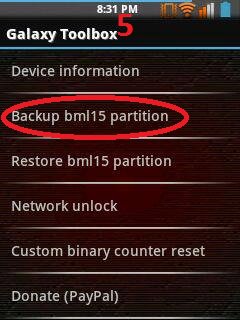
5. On the main menu tap "backup bml15 partition" (it is important you create a back up of your bml15 so that you can restore it later if you want to relock to your default network for warranty purposes)


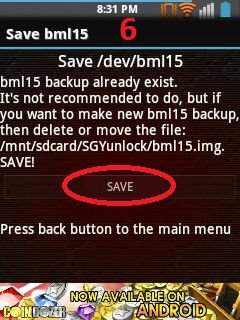
6. Tap "save" to save bml15


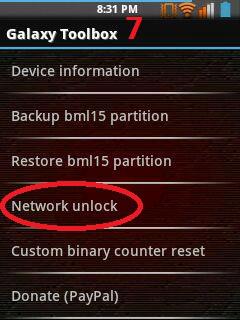
7. after creating a back up, go back to Galaxy Toolbox main menu and tap "Network unlock"


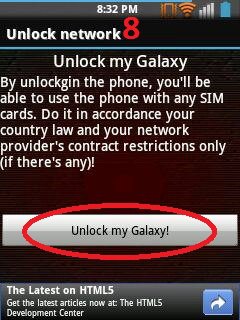
8. Lastly, tap "Unlock my Galaxy!"


Congratulations! Your Samsung Galaxy is now Openline =)

CURRENTLY SUPPORTED DEVICES
SAMSUNG GALAXY Y SERIES

  • GT-S5360
  • GT-S5360B
  • GT-S5360L
  • GT-S5360T
  • GT-S5363
  • GT-S5369
SAMSUNG GALAXY PRO
  • GT-B5510
  • GT-B5510B
  • GT-B5510L
SAMSUNG GALAXY POP PRO
  • GT-S5570I
SAMSUNG GALAXY ACE
  • GT-S5830i
  • GT-S5830C
  • GT-S5830M
  • GT-S5839i


http://sgylove.blogspot.com

Saturday, July 7, 2012

TUTORIAL: How to Increase Internal Phone Memory of Samsung Galaxy Y

Disclaimer: SGY Love will not be responsible nor liable for any damage that might happen to your device during this process though the possibility of any damage is negligible. Try this at your own risk. This process has been tested and verified working on Samsung Galaxy Y.


TUTORIAL: How to Increase Internal Phone Memory of Samsung Galaxy Y

Video Tutorial

INSTRUCTIONS:
1.ROOT your phone first
2.Download CWM and Link2SD and move to sdcard::
3.Install link2sd
4.Restart in Recovery mode :Volume up +Home button +lock button
5.Select apply update from sd card...Select Skin of CWM...go to advanced and partition
6.Select anything upto 1 gb its ur choice .this wil go in internal mamory..select 0mb
5.reboot...Select Link2sd and select "ext3"
6.reboot
7.LINK the apps to sd which you want .


http://sgylove.blogspot.com

CUSTOM ROM: TechnoDUOS for Galaxy Y DUOS

Disclaimer: SGY Love will not be responsible nor liable for any damage that might happen to your device during this process though the possibility of any damage is negligible. Try this at your own risk. This process has been tested and verified working on Samsung Galaxy Y DUOS.

CUSTOM ROM: TechnoDUOS for Galaxy Y DUOS
Features :
=Fully Deodexed
=Zip-aligned
=Busybox + Run-Parts
=Pre-Rooted
=Custom Bootanimation Support
=Bash Command Shell
=init.d Scripts Support
=a2sd or Apps2sd support
=Blue Themed
=Bravia Engine Port
=Dsp Manager
=Modified Stock Music Player
=Bloatwares Removed

INSTALLATION:
=copy TechnoDUOS1.0.zip to the root of your sdcard
=Boot into Recovery using 3 button combo
=wipe data/factory reset
=wipe cache partition
=apply update from sdcard
=select your ___cwm___.zip
=Select zip from sdcard... => TechnoDUOS1.0.zip
=Reboot starting will be slow so wait and don't force stop.

**GUYS MAKE A CWM BACKUP OF YOUR STOCK ROM SO THAT U CAN REVERT BACK.
**This ROM is for Galaxy Y DUOS only.


http://sgylove.blogspot.com

Friday, July 6, 2012

CUSTOM ROM: Repencis ROM v3.5 for Galaxy Y

Disclaimer: SGY Love will not be responsible nor liable for any damage that might happen to your device during this process though the possibility of any damage is negligible. Try this at your own risk. This process has been tested and verified working on Samsung Galaxy Y.

 CUSTOM ROM: Repencis ROM v3.5 for Galaxy Y
 
Main Features:
Rooted
Deodexed all system apks
Based Rom DXLC1
Arabic font plugin
Zipalign all apks on boot
Init.d script support
A2sd Darktremor / Amarul a2sdx support
Adw Launcher Ex as default launcher
ICS Iconized with green default style
New application location management setting
New about rom setting like miui
Navigation button bar (Trial Version)
EDT Tweak + Battery bar + 13 toggle on status bar
adding animation on statusbar
New audio boster bass just using DSPmanager without using tweak audo or other audio installer
new animation transtition
AOSP Lockscreen and Milocker app
New Repencis Labs merge sparepart and quickpanel
- System Replacer to change any system file
- Anti Bootloop to make flashable zip file
- Startup manager to manage on boot apps
- Media scanner to rescan system/sdcard database
- Bang samsul code to see samsul secret code
- DCSMS Customizoid to customize carrier, icon system, main background, theme switcher
And many more......

Performance:
New kernel builded
Adding 17 CPU Governer
Adding 5 i/o schudler
Swap support
Droidwall support
Cool Ram Management
Fast booting and shutdown
Other tweaked things
EXT2, EXT3, EXT4 Support ( auto mount sd-ext as ext4 just format ur sd-ext to ext2/ext3 but in this rom automatic format to ext4 sd-ext)
a2sd darktremor and Amarul a2sdx support
Fix problem from latest version
And many more......

Installation:
-Just Format sd-ext only with mini tool partision as primary type ext2/ext3. 
-For the first time, the splash screen logo will become very long time, just wait and stay cool
-Go to Recovery by Holding Power + Home + Volume up button
-Flash with CWM Recovery: http://db.tt/sIzhV4JP >> CWM_bla_bla.zip
-Select update from zip, select Repencis v3.5-Advanced.zip
-Yes, and wait a moment
-After completed, do a wipe data and wipe cache partition


http://sgylove.blogspot.com

CUSTOM ROM: BazzROM V2.2 for Galaxy Y

Disclaimer: SGY Love will not be responsible nor liable for any damage that might happen to your device during this process though the possibility of any damage is negligible. Try this at your own risk. This process has been tested and verified working on Samsung Galaxy Y.
CUSTOM ROM: BazzROM V2.2 for Galaxy Y

 http://s017.radikal.ru/i416/1202/46/4aacb1668b0c.png
-Stock kernel
-update UI interface by changing image theme look like ics 7
-Support A2SD via teminal application
-BusyboxBox install
-fix data/app to support a2sd
-FIX ERROR IN SIGN ROM
-MARKET WORKING COOL GOOGLE PLAY


- TouchWiz30Launcher
4x4 menu (cool)
5 docks shortcut icon (cool)
Now support LIST VIEW (cool)
ICS transition (cool thanks to ics developer)
Simple and cool
- SystemUI
ICS THEME Status bar.
- change some icon
mms.apk
contacts.apk
DialerTabActivity.apk
calendar.apk
music.apk
Settings.apk

14 Status Bar Toogle With Different color UPDATE NEW!!
"Please download new 7 color status toogle to AVOID BOOTLOOPS i warn you guys ok!"
ics 14 blue toogle
ics 14 orange toogle
ics 14 purple toogle
ics 14 green toogle
ics 14 yellow toogle
ics 14 pink toogle
ics 14 red toogle
INSTRUCTIONS:
1. Copy rom  ROM  on the card 
2. Shut down the recovery by pressing the  Volume up + Home + Power
3. Installing  CWM. Choose  apply update from sdcard, select  CWM-Yes
4.  Choose wipe data / reset and wipe the cache partition-Yes-Yes ( do not skip this step )
5. Select  Install from sdcard zip
6. Select  Choose zip from sdcard
7. Choose rom BazzRom 02.02  -Select  Yes
8. Wait finished, press  Back to return to the main menu. 
9. reboot system now. Done


http://sgylove.blogspot.com

CUSTOM ROM: M.U.R. for Galaxy Y

Disclaimer: SGY Love will not be responsible nor liable for any damage that might happen to your device during this process though the possibility of any damage is negligible. Try this at your own risk. This process has been tested and verified working on Samsung Galaxy Y. 

CUSTOM ROM: M.U.R. for Galaxy Y
 

-based on dxlb1
-deodexed
-zipaligned
-based icon from ICS circle nexus
-new statbar ui
-lidroid toggle added
-support swap
-EXT4 SYSTEM DATA AND CACHE
-swipe to remove added
-ics style setting
-built in 2launcher(samsunghome with 5dock,and holo launcher beta 3)
-a2sd supported(needfix)


INSTALLATION:
-Download the zip file
-put on ur sdcard

-turn off the phone goto recovery
-enter cwm(skin or whatever cwm)
-instal M.U.R.zip wait till succesed
-before reboot system choose advance first. Choose fix permissions[ignore error]
-reboot it will stuck at boot logo
-flash kernel merrukv2pre final via odin (this is important step to make the rom booted)oh yeah don't forget estract system 10.8[drive letter system] in sdcard and reboot twice  



http://sgylove.blogspot.com